We capture more photos than ever before—from smartphone snapshots to professional camera shots—creating vast libraries that quickly become overwhelming without proper organization. Whether you’re a professional photographer managing client portfolios, an enthusiast preserving years of travel memories, or simply someone drowning in thousands of unsorted family photos, the right photo organizer can transform chaos into order.
Windows 11 users have access to an impressive array of photo management solutions, each offering unique approaches to organizing, searching, and preserving digital memories. From AI-powered cloud services that automatically categorize your collection to professional-grade desktop applications with advanced cataloging capabilities, the options cater to every skill level and requirement.
How to Choose the Best Photo Organizer for Windows 11

Selecting the right photo organizer for Windows 11 can transform how you manage your digital memories, but with dozens of options available, making the right choice requires careful consideration of your specific needs and workflow preferences.
Assess Your Collection Size and Growth
Start by evaluating your current photo library size and anticipated growth. If you have thousands of images with plans to add hundreds more monthly, you need robust software like Adobe Lightroom Classic or ACDSee that handles large databases efficiently. Smaller collections of a few thousand photos work perfectly well with lightweight solutions like XnView MP or Google Photos. Consider not just current needs but where you’ll be in five years—switching photo organizers later means re-cataloging everything, which can be time-consuming and frustrating.
Define Your Primary Use Case
Understanding why you’re organizing photos is crucial. Professional photographers need advanced cataloging, RAW support, and integration with editing workflows, making Lightroom Classic or digiKam ideal choices. Casual users wanting automatic backup and easy sharing should lean toward Google Photos or Mylio Photos. Content creators prioritizing quick edits and social media sharing will benefit from CyberLink PhotoDirector 365’s streamlined workflow.
Evaluate Search and Discovery Features
Modern photo organizers offer varying levels of search sophistication. If you’ve never tagged photos and have years of unorganized images, AI-powered solutions like Excire Foto or Google Photos that automatically recognize content are invaluable. These applications identify objects, people, and scenes without manual input, making your collection instantly searchable. Traditional organizers require manual tagging but offer more precise control over organization schemes.
Consider Storage and Privacy Preferences
Your comfort level with cloud storage significantly impacts the right choice. Cloud-based solutions like Google Photos provide automatic backup and cross-device access but require trusting third-party servers with your personal photos. Privacy-conscious users should choose local solutions like ACDSee, digiKam, or XnView MP that keep photos entirely under your control. Hybrid options like Mylio Photos offer multi-device syncing without mandatory cloud dependence, providing a middle ground.
Budget and Pricing Models
Photo organizers employ different pricing strategies. Subscription models like Adobe Lightroom Classic ($9.99/month) and PhotoDirector 365 provide continuous updates and cloud storage but represent ongoing costs. Perpetual licenses like ACDSee ($99 one-time) and Zoner Photo Studio X eliminate recurring fees but may charge for major upgrades. Free options including Google Photos (with storage limits), digiKam, XnView MP, and Nomacs provide excellent functionality without financial commitment, though they may lack premium features or support.
Technical Requirements and Performance
Ensure the software runs smoothly on your hardware. Resource-intensive applications like Lightroom Classic require powerful processors and ample RAM, especially for large libraries. Lightweight alternatives like Nomacs or XnView MP perform excellently on older or less powerful computers. Check system requirements before committing, and take advantage of free trials to test performance with your actual photo collection.
Integration and Ecosystem

Consider how the photo organizer fits into your existing workflow. If you use Adobe Creative Cloud, Lightroom Classic’s integration is seamless. Google Photos works effortlessly with Android devices and Google services. Some organizers offer plugins and extensions that enhance functionality—Excire Foto integrates with Lightroom, while digiKam supports various import/export tools.
Try Before Committing
Most commercial photo organizers offer free trials ranging from 7 to 30 days. Use this period to import a representative portion of your collection and test core features like search, facial recognition, and organization tools. Pay attention to interface intuitiveness—you’ll spend considerable time with this software, so comfort and ease of use matter significantly.
The best photo organizer ultimately depends on balancing these factors against your personal priorities, ensuring your precious memories remain organized, accessible, and secure for years to come.
This comprehensive guide explores the 10 best photo organizers for Windows 11, each offering unique features to help you sort, edit, and manage your digital photo collection efficiently.
1. Adobe Lightroom Classic
Adobe Lightroom Classic remains the gold standard for professional photographers and serious enthusiasts who need powerful organization capabilities combined with advanced editing tools. This desktop application is designed specifically for photographers who manage large libraries of images and require non-destructive editing workflows.
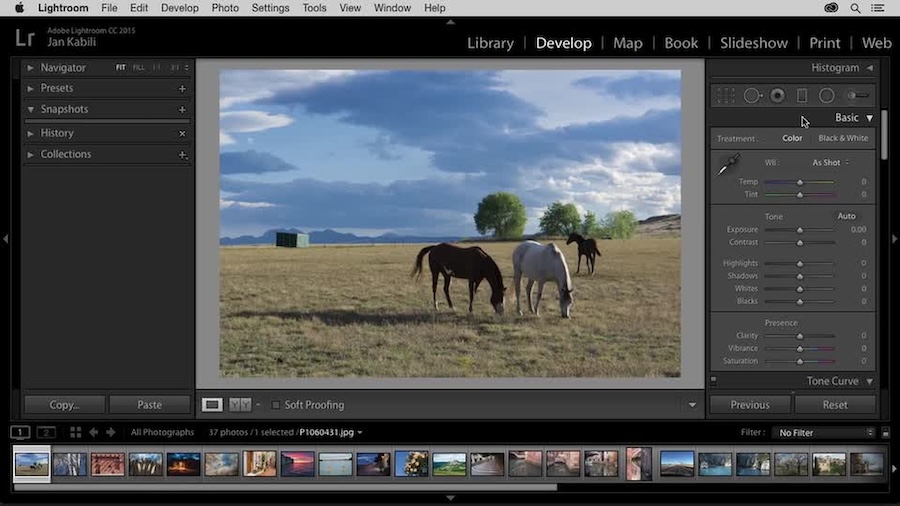
The software excels at organizing photos through its comprehensive catalog system that stores all metadata, edits, and organizational information in a centralized database. You can import thousands of images and instantly organize them using keywords, star ratings, color labels, and custom collections. The facial recognition technology automatically identifies and groups people across your entire library, making it effortless to find all photos of specific individuals. Geographic organization is seamless with built-in map modules that display where your photos were taken based on GPS data.
Lightroom Classic’s filtering and search capabilities are exceptionally robust, allowing you to find specific images using multiple criteria simultaneously. The smart collections feature automatically groups photos based on rules you define, such as all five-star images taken with a specific camera in the last month. The application also offers extensive editing tools including exposure adjustment, color correction, lens corrections, and advanced local adjustments.
Key Features:
- Comprehensive catalog system for unlimited photos
- Advanced facial recognition and people tagging
- GPS-based map organization
- Smart collections with automatic grouping
- Non-destructive editing with adjustment history
- Keyword hierarchy and batch tagging
- Integration with Adobe Creative Cloud
- Powerful search and filtering options
Why Choose Adobe Lightroom Classic: Choose Lightroom Classic if you’re serious about photography and need professional-grade organization combined with powerful editing tools. It’s ideal for photographers managing tens of thousands of images who require a reliable, scalable solution. The subscription model includes regular updates and cloud storage options, making it a future-proof investment. While it has a learning curve, the time invested in mastering Lightroom Classic pays dividends in workflow efficiency and organizational capabilities that grow with your collection.
2. ACDSee Photo Studio
ACDSee Photo Studio has been a trusted name in photo management for over two decades, offering a comprehensive solution that balances powerful organization tools with robust editing capabilities. Unlike cloud-dependent solutions, ACDSee operates primarily as a local application, giving you complete control over your photo library without subscription fees.
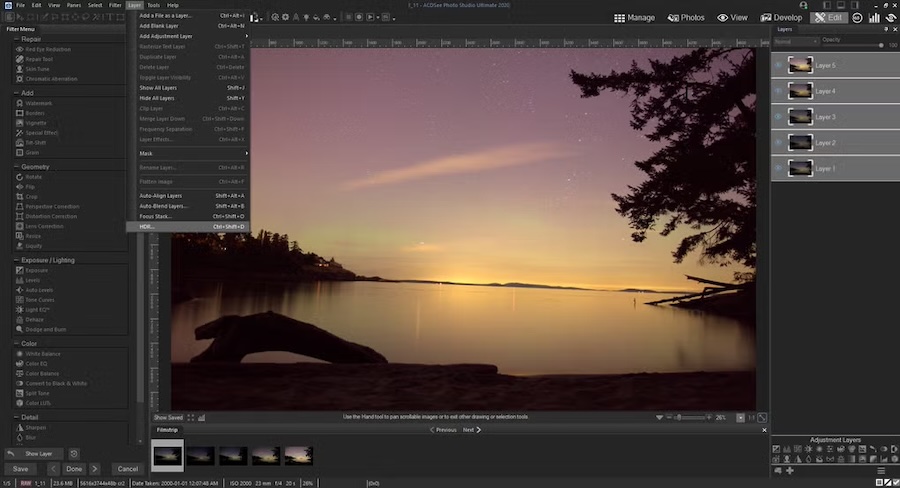
The interface is divided into distinct modes: Manage, View, Edit, and 365 (cloud features), allowing you to focus on specific tasks without clutter. The Manage mode provides lightning-fast browsing through folders and categories, with the ability to organize photos using a hierarchical category system, ratings, color labels, and custom metadata fields. ACDSee’s database-driven cataloging system indexes your entire collection for rapid searching, while the facial recognition feature accurately identifies people across your library.
One standout feature is the People mode, which not only recognizes faces but also allows you to create hierarchical relationships between people, perfect for organizing family photos across generations. The application supports an impressive range of file formats, including RAW files from virtually every camera manufacturer. Batch processing capabilities let you rename, resize, convert, and apply edits to hundreds of photos simultaneously, saving enormous amounts of time.
Key Features:
- Perpetual license with no subscription required
- Lightning-fast browsing and cataloging
- Hierarchical categories and keyword system
- Advanced facial recognition with relationship mapping
- Support for 100+ file formats including RAW
- Powerful batch processing tools
- Non-destructive editing layer
- Duplicate finder and file management tools
Why Choose ACDSee Photo Studio: ACDSee is the perfect choice for photographers who prefer owning their software outright rather than paying monthly subscriptions. It excels at managing local photo collections with impressive speed and efficiency, even with libraries containing hundreds of thousands of images. The combination of professional organization tools and capable editing features makes it a one-stop solution. If you value privacy, work offline frequently, or simply want complete control over your photo library without cloud dependencies, ACDSee Photo Studio delivers exceptional value with its perpetual licensing model and regular feature updates for licenseholders.
3. Google Photos Desktop
Google Photos has revolutionized photo organization for millions of users worldwide by offering unlimited cloud storage for high-quality photos (with compression) and using artificial intelligence to automatically organize and enhance your collection. While primarily cloud-based, the desktop uploader and web interface make it fully functional on Windows 11.

The AI-powered organization is truly remarkable, automatically categorizing photos by people, places, things, and even identifying specific objects like “birthday cake” or “sunset.” You don’t need to manually tag anything—Google’s machine learning algorithms do the heavy lifting. The search functionality is extraordinarily powerful; you can search for abstract concepts like “hugs,” “beach,” or “food” and Google Photos will accurately locate relevant images from your entire library. The facial recognition system continuously improves, grouping photos of the same person even as they age.
Google Photos creates automatic albums, animations, and collages from your best photos, surfacing memories you might have forgotten. The “Memories” feature resurfaces photos from past years on the same date, creating nostalgic moments. Sharing is seamless—you can create shared albums that multiple people can contribute to, perfect for family events or trips. The built-in editing tools are surprisingly capable for basic adjustments, filters, and one-tap enhancements.
Key Features:
- Free cloud storage with compression (paid for original quality)
- Powerful AI-based automatic organization
- Advanced search using objects, people, and places
- Automatic backup from all devices
- Facial recognition across your library
- Automatic creation of animations and collages
- Easy sharing and collaborative albums
- Cross-platform access from any device
Why Choose Google Photos Desktop: Google Photos is the ideal choice for users who prioritize convenience and accessibility over local storage control. If you have photos scattered across multiple devices and want them automatically backed up and organized without manual effort, Google Photos is unbeatable. The free tier is generous, and the AI-powered features save countless hours of manual organization. It’s perfect for families who want to share photos easily, travelers who need reliable backup while on the go, or anyone who prefers accessing their photos from any device with an internet connection. The automatic backup feature provides peace of mind that your memories are safe.
4. Zoner Photo Studio X
Zoner Photo Studio X is a comprehensive photo management and editing solution that originated in the Czech Republic and has grown into a powerful alternative to Adobe’s offerings. It provides an all-in-one approach that handles everything from importing and organizing to advanced editing and sharing, all within a single intuitive interface.
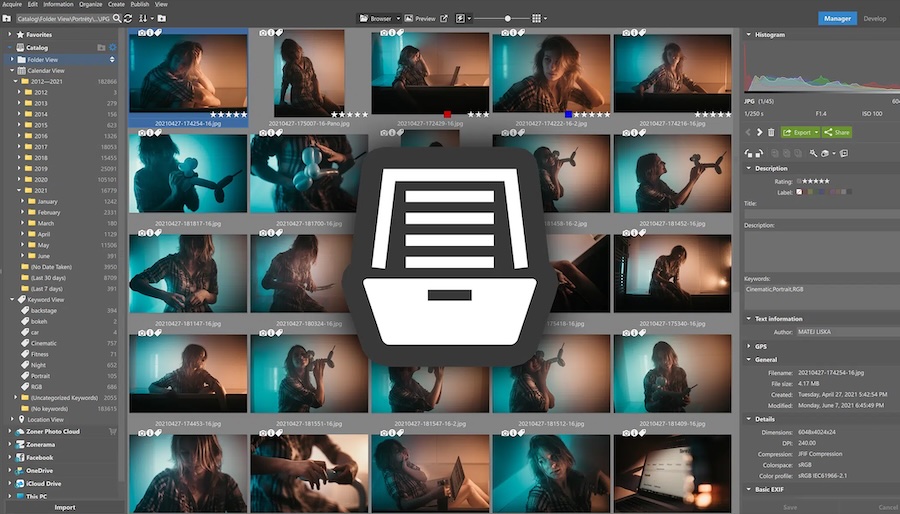
The Manager module serves as the organizational hub, where you can browse, sort, and categorize your entire photo collection. Zoner uses a combination of folder-based organization and catalog features, giving you flexibility in how you structure your library. The application automatically reads EXIF data and GPS coordinates, allowing you to filter and search photos by camera settings, location, date, and custom keywords. The facial recognition technology works efficiently to identify and group people, though it requires some initial training for best results.
What sets Zoner apart is its integrated approach—you never need to leave the application to perform any photo-related task. The Editor module provides layer-based editing similar to Photoshop but with a more accessible interface. The Develop module handles RAW processing with professional-grade controls. Zoner also includes unique features like automatic photo enhancement AI that can improve images with a single click, panorama stitching, HDR creation, and even basic video editing capabilities.
Key Features:
- All-in-one solution for managing, editing, and sharing
- Integrated Manager, Editor, and Develop modules
- GPS-based geotagging and map view
- Facial recognition and people management
- AI-powered automatic enhancement
- Layer-based editing with masks and effects
- RAW processing with advanced controls
- Built-in panorama and HDR tools
Why Choose Zoner Photo Studio X: Zoner Photo Studio X is an excellent choice for photographers who want a complete photography workflow in a single application without the complexity of Adobe’s ecosystem or the high subscription costs. The perpetual license option makes it cost-effective for long-term use. It’s particularly well-suited for enthusiast photographers who need more than basic organization tools but don’t require the absolute cutting-edge features of professional software. The intuitive interface makes advanced features accessible to users transitioning from consumer-grade tools, while still providing the power that experienced photographers demand.
5. Mylio Photos
Mylio Photos represents a unique approach to photo organization, designed specifically for people who store photos across multiple devices and want them synchronized without relying entirely on cloud storage. It creates a unified library that exists simultaneously on your computer, smartphone, tablet, and external drives, with intelligent syncing that keeps everything current.
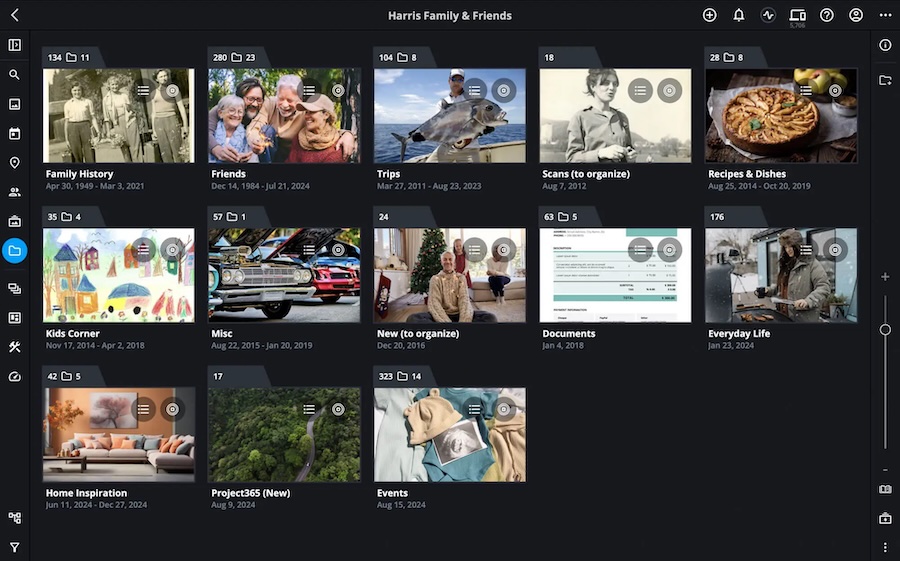
The organizational philosophy of Mylio centers on calendar-based browsing combined with powerful filtering tools. Photos automatically appear in a timeline view, making it intuitive to navigate through years of memories chronologically. You can add keywords, star ratings, color labels, and organize photos into albums that sync across all your devices. The facial recognition system identifies people and creates albums for each individual, learning and improving over time with minimal user intervention.
What makes Mylio truly special is its vault system—you can designate multiple locations as vaults (external drives, NAS devices, or computers) and Mylio ensures your entire library is backed up across these locations. This provides redundancy without relying solely on cloud services. The smart preview system stores optimized versions on devices with limited storage while keeping full-resolution images on devices with ample space. Mylio also includes privacy-focused features, allowing you to keep sensitive photos offline while still having them organized within your library.
Key Features:
- Multi-device syncing without cloud dependence
- Calendar-based timeline organization
- Facial recognition with automatic albums
- Vault system for redundant local backups
- Smart previews for storage optimization
- Privacy zones for sensitive content
- Support for RAW files and EXIF metadata
- Works offline with background syncing
Why Choose Mylio Photos: Mylio Photos is perfect for users who have photos spread across multiple devices and want seamless organization without paying for expensive cloud storage subscriptions. It’s ideal for privacy-conscious individuals who prefer keeping their photos under their own control rather than on third-party servers. Families with multiple devices benefit from Mylio’s ability to create a unified family library that everyone can access and contribute to. The free tier is surprisingly generous, making it accessible for casual users, while paid tiers unlock unlimited devices and additional features. Choose Mylio if you value data sovereignty, need reliable backup without internet dependence, and want your photos accessible everywhere.
6. Excire Foto
Excire Foto brings cutting-edge artificial intelligence to photo organization, offering what may be the most advanced search capabilities available in any consumer photo management application. Developed by a German company specializing in computer vision, Excire Foto analyzes every image in your collection using sophisticated AI algorithms to understand content, composition, and visual characteristics.
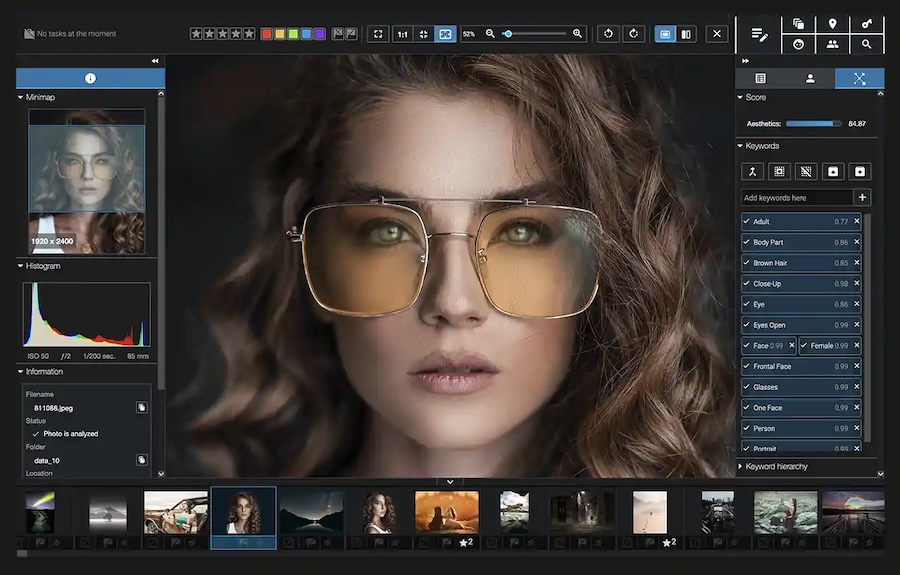
The search functionality is truly revolutionary—you can search using natural language queries like “beach at sunset,” “children playing,” or “red car in front of a building” and Excire will find matching photos with remarkable accuracy. The AI recognizes thousands of objects, scenes, colors, and concepts without requiring any manual tagging. Beyond content recognition, Excire analyzes aesthetic qualities like blur, composition, and technical qualities like exposure and sharpness, allowing you to filter for your best-composed or technically superior shots.
Excire Foto also offers similarity search—select any photo and the software will find visually similar images based on color, composition, or content. This is incredibly useful for finding near-duplicates, alternative shots from the same session, or photos with similar aesthetic qualities. The duplicate detection is particularly intelligent, finding not just identical files but also similar versions with slight variations in crop, exposure, or format.
Key Features:
- Advanced AI-based content recognition
- Natural language search without manual tagging
- Recognition of thousands of objects and scenes
- Aesthetic and technical quality analysis
- Similarity search and duplicate detection
- Keyword suggestions based on image content
- Integration with Lightroom Classic
- Completely offline AI processing
Why Choose Excire Foto: Choose Excire Foto if searching through large photo collections frustrates you or if you’ve never had time to properly tag your photos. It’s perfect for photographers with extensive archives who need to locate specific types of images quickly—professional photographers, stock photographers, and visual researchers will find it invaluable. The AI runs entirely on your computer, ensuring privacy while delivering impressive results. While Excire Foto works as a standalone application, it also integrates seamlessly with Lightroom Classic, adding its powerful AI search capabilities to Adobe’s ecosystem. If you’ve accumulated thousands of unorganized photos over the years and want to make them discoverable without spending months tagging, Excire Foto is a game-changer.
7. digiKam
digiKam is a powerful open-source photo management application that rivals commercial alternatives in features while remaining completely free. Developed by a dedicated community of photographers and programmers, digiKam has evolved over two decades into a professional-grade tool that works equally well on Windows 11, Linux, and macOS.
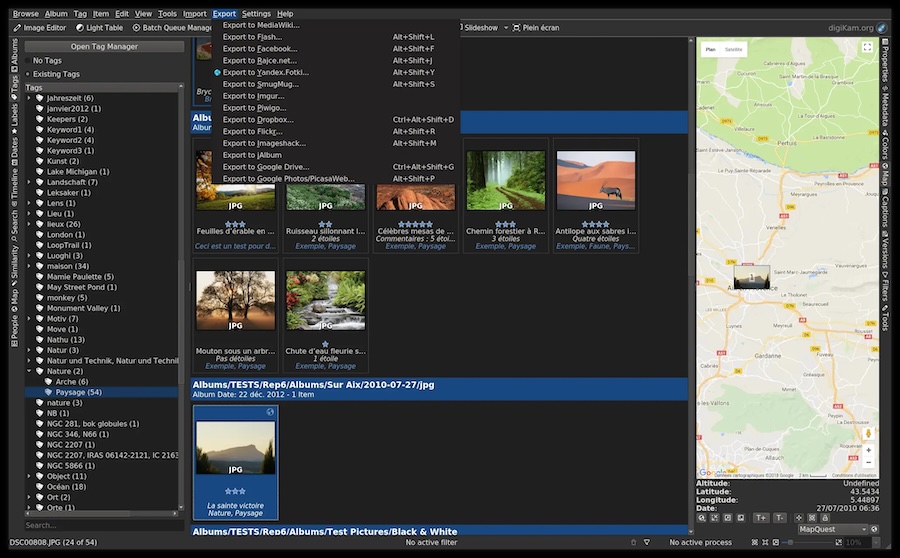
The organizational capabilities are extensive, utilizing a database backend (MySQL, MariaDB, or SQLite) to catalog unlimited photos with impressive performance. You can organize photos using hierarchical tags, ratings, labels, and geographic information. The metadata editor is exceptionally detailed, allowing you to modify EXIF, IPTC, and XMP data comprehensively. DigiKam’s facial recognition system uses advanced algorithms to identify and tag people across your collection, learning from your corrections to improve accuracy over time.
The application includes powerful search tools with the ability to create complex queries combining multiple criteria. You can search by date ranges, file properties, tags, ratings, colors, locations, and even text found within images using OCR. DigiKam also features a versioning system that tracks all edits non-destructively, batch processing tools for renaming and converting files, duplicate detection, and automatic image quality sorting. The map view displays photos based on GPS coordinates, while the timeline view organizes chronologically.
Key Features:
- Completely free and open-source
- Support for professional databases (MySQL/MariaDB)
- Advanced facial recognition technology
- Comprehensive metadata editing (EXIF, IPTC, XMP)
- Powerful search with complex query building
- Non-destructive editing with version control
- Batch processing and conversion tools
- Map-based geolocation browsing
Why Choose digiKam: digiKam is the best choice for photographers who want professional-grade organization tools without subscription fees or purchase costs. It’s ideal for privacy-conscious users who appreciate open-source software and want complete transparency about how their data is handled. While the interface may appear less polished than commercial alternatives, the feature set rivals or exceeds expensive professional software. DigiKam particularly appeals to Linux users who have limited commercial options, but Windows 11 users will find it equally capable. Technical users who want to use enterprise-grade databases for their photo collections will appreciate the MySQL/MariaDB support. Choose digiKam if you value freedom, customization, and a one-time learning investment that won’t be held hostage by changing subscription models.
8. CyberLink PhotoDirector 365
CyberLink PhotoDirector 365 combines intuitive photo organization with powerful editing tools and creative features, all wrapped in a modern, user-friendly interface designed for Windows users. Unlike pure management tools, PhotoDirector emphasizes the creative workflow, making it easy to move from organizing to editing to sharing seamlessly.
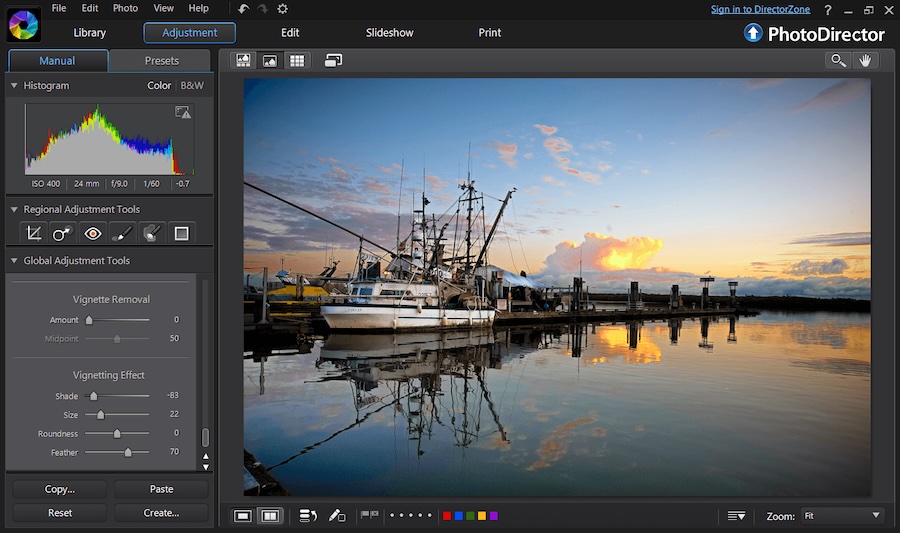
The organizational features in PhotoDirector focus on practicality and speed. The Library module provides face tagging that automatically groups photos of the same people together, requiring minimal manual intervention. You can rate photos with stars, apply color labels, and add keywords for easy searching. The smart organization features automatically detect blurry photos, duplicates, and technically inferior shots, helping you quickly curate your collection. Calendar and folder views make navigation intuitive, while the facial recognition continually improves as you confirm or correct its suggestions.
What distinguishes PhotoDirector is its AI-powered creative tools integrated directly into the workflow. Features like AI style transfer, sky replacement, object removal, and automatic subject selection make creative editing accessible to users without extensive technical knowledge. The application also includes animation tools for creating living photos, video editing capabilities, and direct integration with social media platforms for effortless sharing.
Key Features:
- Unified organization and editing environment
- AI-powered facial recognition
- Automatic detection of blurry and duplicate photos
- AI creative tools (sky replacement, style transfer)
- Layer-based editing with masks and effects
- Animation and slideshow creation
- Video editing capabilities
- Direct social media sharing
Why Choose CyberLink PhotoDirector 365: PhotoDirector 365 is perfect for enthusiast photographers and content creators who want an all-in-one solution that emphasizes creativity as much as organization. It’s particularly well-suited for social media content creators who need to quickly organize, edit, and share photos across platforms. The subscription includes regular feature updates with new AI capabilities, extensive royalty-free stock images, and cloud storage. The interface is more approachable than professional tools like Lightroom, making it ideal for users transitioning from basic photo applications who want more power without overwhelming complexity. Choose PhotoDirector 365 if you value creative features, enjoy experimenting with AI-powered effects, and want a modern tool that stays current with emerging photography trends.
9. XnView MP
XnView MP is a versatile and lightweight photo organizer that excels at handling massive collections with impressive speed while remaining completely free for personal use. As a multi-platform viewer and converter, XnView MP supports over 500 image formats, making it invaluable for users dealing with diverse file types from various sources and legacy formats.
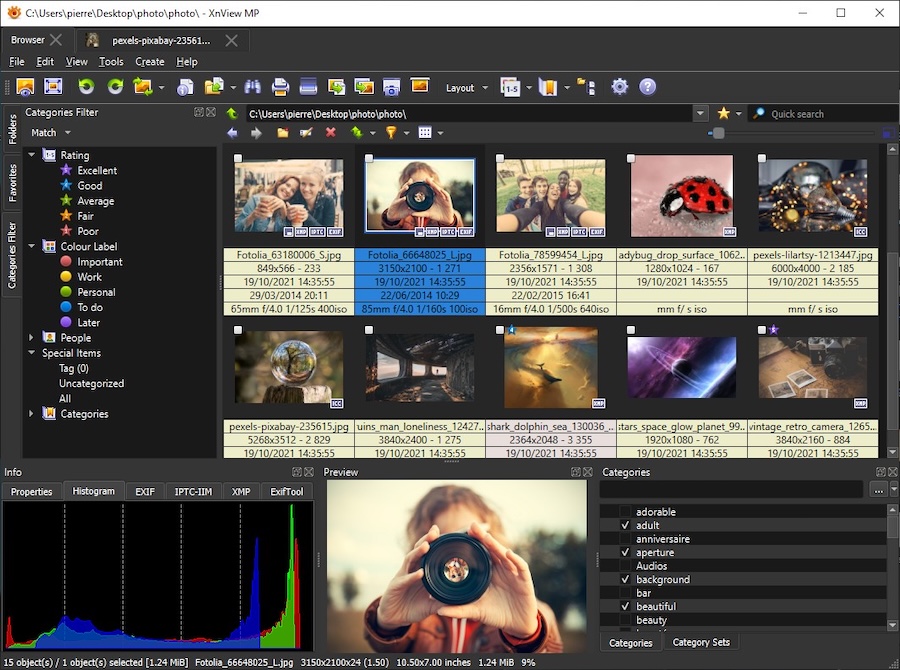
The browser interface provides quick access to photos organized by folders, with thumbnail views that load nearly instantaneously even for large directories. You can rate images, add color labels, apply keywords, and add IPTC metadata all within the browsing view. The metadata editor is comprehensive, allowing detailed editing of EXIF, IPTC, and XMP data. XnView MP includes categories that work like virtual folders, letting you organize photos without moving files physically—perfect for maintaining existing folder structures while adding organizational layers.
Batch processing is where XnView MP truly shines, offering extensive conversion, resizing, renaming, and metadata editing capabilities across hundreds or thousands of files simultaneously. The application can create contact sheets, generate web pages, compare images side-by-side, and even perform lossless JPEG transformations. The search functionality allows filtering by metadata, dates, keywords, and file properties, while the duplicate finder helps clean up collections efficiently.
Key Features:
- Support for 500+ image formats
- Lightning-fast browsing of large collections
- Comprehensive metadata editing (EXIF, IPTC, XMP)
- Powerful batch conversion and processing
- Category system for virtual organization
- Advanced search and filtering
- Duplicate detection
- Completely free for personal use
Why Choose XnView MP: XnView MP is the ideal choice for users who need reliable, fast photo viewing and organization without complexity or cost. It’s perfect for managing personal photo archives, organizing scanned documents, or handling specialized image formats that other applications don’t support. Photographers who work with legacy formats, receive images in unusual formats, or need extensive batch conversion capabilities will find XnView MP indispensable. The free license makes it accessible to everyone, while the lightweight design ensures it runs smoothly even on older or less powerful computers. Choose XnView MP if you value simplicity, speed, and comprehensive format support, or if you need a reliable secondary tool for batch operations alongside your primary photo management application.
10. Nomacs
Nomacs is a fast, lightweight, and completely open-source image viewer that includes essential organizational features wrapped in a minimalist, distraction-free interface. While not as feature-rich as database-driven photo managers, Nomacs excels at quick browsing, viewing, and basic organization tasks with remarkable speed and efficiency on Windows 11.
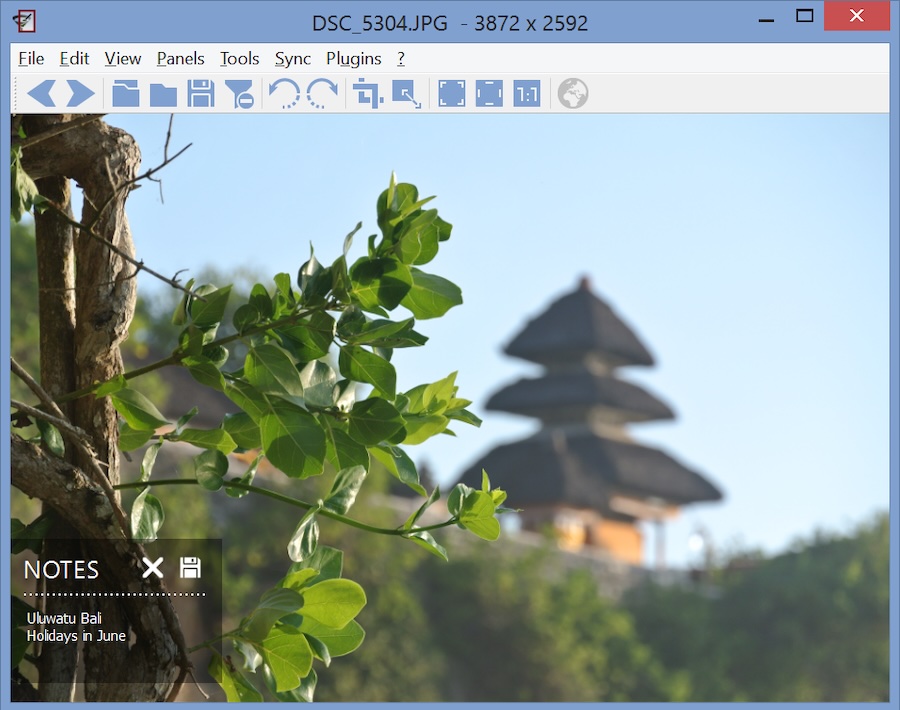
The interface is designed for simplicity—you can view images in fullscreen or windowed mode with thumbnails, metadata panels, and histogram overlays that appear only when needed. Nomacs displays images with exceptional quality, supporting RAW formats from major camera manufacturers and a wide range of common image formats. The semi-transparent window feature allows you to overlay Nomacs on other applications, useful for comparing images with reference materials or comparing photos side-by-side.
Nomacs includes practical organizational tools like batch renaming, basic metadata editing, and the ability to add notes directly to images for reference. The synchronization feature is unique—you can open multiple Nomacs windows and have them display different parts of the same image or synchronized views of different images, invaluable for comparing details across photos. File management is streamlined with quick access to common operations like copying, moving, and deleting without leaving the viewer.
Key Features:
- Lightweight and extremely fast
- Support for RAW and common image formats
- Semi-transparent window overlay mode
- Synchronized viewing across multiple windows
- Basic metadata viewing and editing
- Batch renaming capabilities
- Histogram and color information overlays
- Completely free and open-source
Why Choose Nomacs: Choose Nomacs if you need a simple, fast, and reliable image viewer that doesn’t burden your system with unnecessary features or background processes. It’s perfect as a lightweight secondary viewer alongside more comprehensive photo management applications, or as the primary tool for users who prefer folder-based organization and don’t need extensive cataloging features. Nomacs is ideal for quick photo reviews, culling sessions where you need to rapidly view and delete unwanted shots, or comparing similar images in detail. The open-source nature ensures complete transparency and community-driven development. If you value minimalism, speed, and efficiency over comprehensive features, or if you’re using an older computer that struggles with resource-intensive applications, Nomacs provides everything essential without the bloat.
Conclusion
Choosing the right photo organizer for Windows 11 depends on your specific needs, workflow preferences, and the size of your photo collection. Professional photographers managing extensive libraries with advanced editing requirements will find Adobe Lightroom Classic or ACDSee Photo Studio most suitable. Users prioritizing cloud convenience and AI-powered organization should consider Google Photos or Mylio Photos. Privacy-conscious photographers or those preferring open-source solutions will appreciate digiKam or XnView MP.
For creative content creators seeking modern AI features, CyberLink PhotoDirector 365 offers an excellent balance of organization and creative tools. Those with massive archives requiring powerful search capabilities should explore Excire Foto’s revolutionary AI technology. Budget-conscious users have excellent free options including digiKam, XnView MP, and Nomacs, each excelling in different aspects of photo management.
Ultimately, the best photo organizer is one that matches your workflow, fits your budget, and makes rediscovering your memories enjoyable rather than overwhelming. Many of these applications offer free trials, allowing you to test their interfaces and features before committing. Consider starting with a free option like Google Photos or XnView MP to understand your organizational needs, then graduating to more specialized tools as your requirements become clear. Your photos represent irreplaceable memories—investing time in choosing the right organizational tool ensures they remain accessible, searchable, and enjoyable for years to come.